Home Cleverscope | Oscilloscopes Cleverscope Installation on Windows Vista
Cleverscope | Oscilloscopes

Cleverscope Installation on Windows Vista

This guide outlines the installation process for Cleverscope software on Windows Vista, ensuring that users can set up the system correctly for use with the CS328 MSO (Mixed Signal Oscilloscope) and begin signal acquisition..

  • Detail
  • Special Features
  • Specification

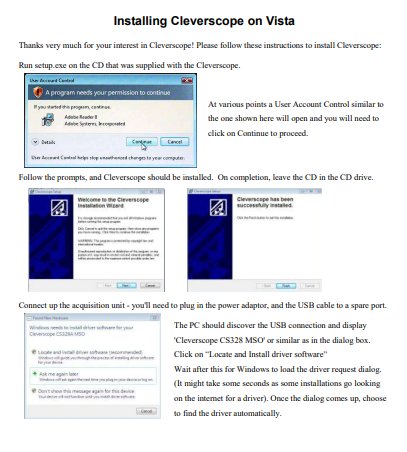
The Cleverscope Vista Installation Guide provides comprehensive instructions for installing Cleverscope on a Windows Vista machine. It begins with running the setup.exe from the supplied CD, followed by handling UAC prompts that will appear during installation. Once the installation begins, the necessary drivers are automatically detected and installed from the CD.

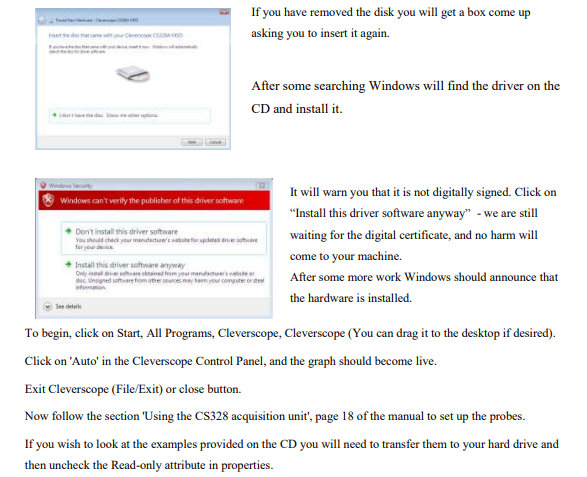
After the software is installed, you will connect the Cleverscope CS328 MSO acquisition unit to the PC via USB, where Windows will detect the hardware and proceed with driver installation. It will prompt users to install the driver, even if it is not digitally signed. Once completed, the hardware is ready for use, and Cleverscope can be launched.

  • Step-by-Step Installation: Clear instructions to install Cleverscope from the CD, including driver installation and setup.

  • User Account Control (UAC): Instructions to manage UAC prompts during installation to allow the software to install properly.

  • Automatic Driver Detection: Windows Vista automatically detects the Cleverscope hardware and installs the required drivers.

  • CD Driver Support: Driver installation from the supplied CD, even if not digitally signed, ensuring no security issues arise.

  • Easy Setup: Simplified setup with automatic detection of the connected CS328 MSO acquisition unit.

Parameter Details
Supported OS Windows Vista
Software Installation Run setup.exe from the supplied CD
Driver Installation Automatic driver detection and installation
User Account Control (UAC) Prompt for permission during installation
USB Connection Connect Cleverscope CS328 MSO via USB port
Driver Warning Windows will notify of unsigned drivers, click "Install Anyway"
Cleverscope Launch Use Start > All Programs > Cleverscope to open the software
Probe Setup Refer to "Using the CS328 Acquisition Unit" section of the manual
Example Files Transfer example files to your hard drive and uncheck "Read-Only" attribute